

District Social Media
Follow, share and tag. How your club and the district lift each other's posts.
District social media
Content travels when members share it.
520
Facebook followers, up 146 since July
As at November 2026
2 in 3
September views came from people who don't follow the page
September 2026
44
shares of the Nepal appeal, which reached 2,298 people
As at November 2026
Find us
- Facebook: facebook.com/RotaryDistrict9660
- Instagram: @rotary9660
- TikTok: @rotary.d9660
- Hashtags on every club post: #Rotary #RotaryDistrict9660 #PeopleOfAction
Tag Rotary District 9660 in your club's posts so we can find and share them, and share one district post a week to your club page.
Invite your friends to follow
Thirty seconds on your phone. The same steps work for your club's own page.
- Search for Rotary District 9660 in the Facebook app.
- Tap the page to open it.
- Tap the three dots at the top.
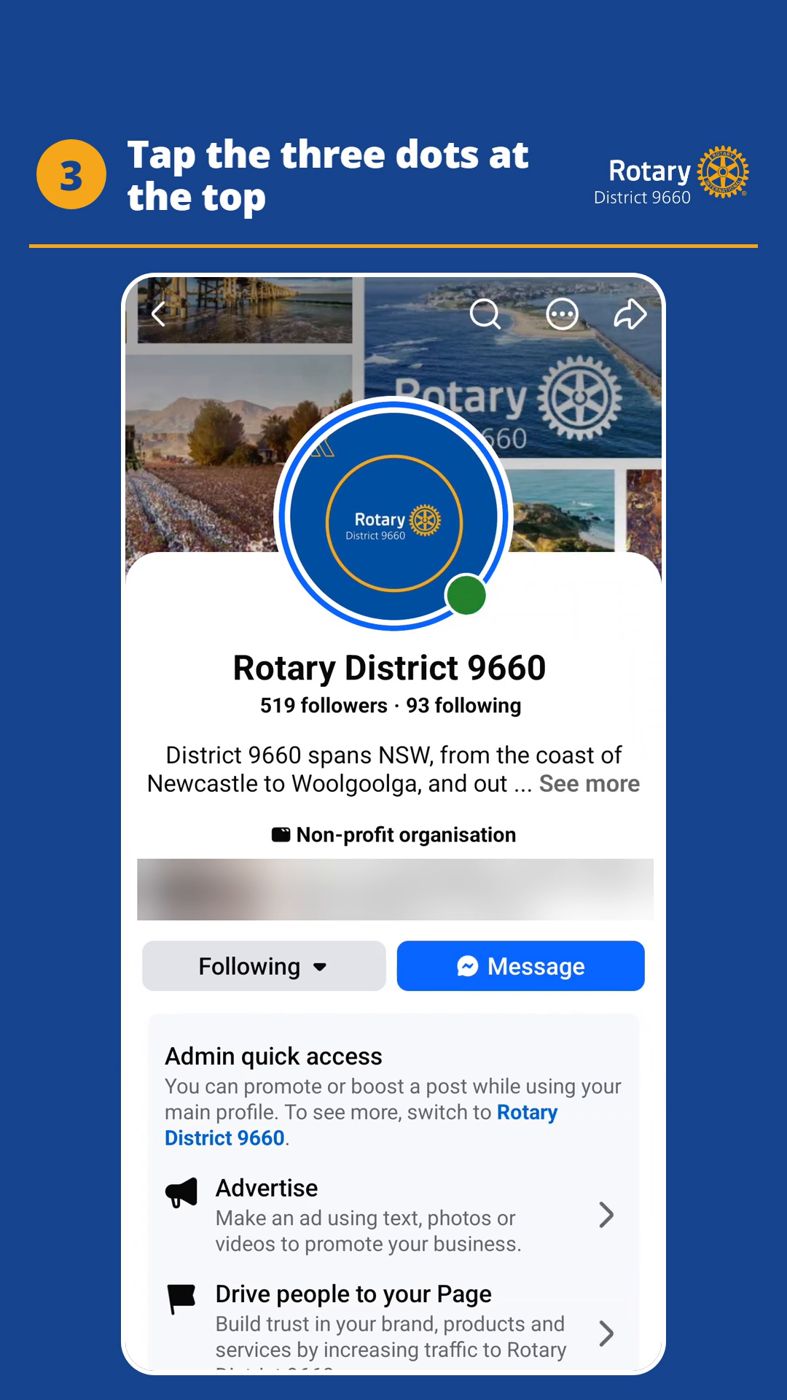
- Tap Invite friends.
- Tap Select All.
- Tap Send Invitations.
Watch the 19-second video: facebook.com/reel/1741726306921821. Share it with your club.
The event photo challenge
Use this at any district event, or your own.
- Take a photo of people doing things. Light, tight and bright.
- Post it and tag the district. Tag Rotary District 9660 on Facebook and add #RotaryDistrict9660.
- Share it on your own Facebook. Your friends see it, not just Rotarians.
- Get your club page to share it, or post its own. Ask your page admin before you head home.
Something the district should post?
Send photos, short videos and a few lines to socialmedia@rotary9660.org.au.