


Youth Exchange: A Guide for Students
How to ask permission to travel, and how to submit your monthly report.
On this page
Asking permission to travel
If you want to travel away from your host town, you must ask for permission first. You do this online, at support.rotary9660.org.au/yep-travel. You do not need to sign in.
Fill in:
- Your details and your host club.
- Your host parents' names and email address.
- Your Club Counsellor's and YEO's names. You can leave these blank. When you submit, we look you up on the Youth Exchange roster using your student email and fill them in for you.
- The travel level, dates, destination, and who you are travelling with.
It means we could not work out who approves your travel. The usual cause is that the student email you entered is not exactly the one Rotary has for you, so check that first. Either way, nothing you typed is lost: the form marks the boxes it needs, you fill them in, and you submit again. Tell your Club Counsellor afterwards so your record can be fixed for next time.
How much notice to give
Submit your request early. Late requests may not be approved in time.
- Local or regional travel: at least 14 days before you plan to travel.
- International travel: at least 30 days before you plan to travel.
What happens after you submit
Four people need to say yes before you can travel. They approve in this order, one at a time:
flowchart TD
  S["You submit the request"] --> HP["Host parents approve"]
  HP --> CC["Club Counsellor approves"]
  CC --> Y["District YEO approves"]
  Y --> CH["YEP Chair approves"]
  CH --> DONE["You are free to travel"]
This order is the same for every trip, short or long, local or international.
If your trip is international, one more person must also approve, after the YEP Chair: the District Governor.
Each person is only asked once it is their turn. Nobody skips ahead, and nobody further down the list is asked before the person in front of them has approved.
Nobody can tell you exactly. Four or five people each need to check their email and click a button, and people are sometimes away or busy. This is why you should submit your request early, especially for international travel.
If anyone in the chain says no, your request stops there. You will be told why. Talk to them if you want to understand more, and submit a new request if your plans change.
Checking your status
When you submit a request, you get a link by email. Use that same link at any time to see:
- Who has approved so far.
- Whose turn it is now.
- Whether your request has been approved, declined, or is still waiting.
If you cannot find your link, check your Junk or Spam folder for an email from support@rotary9660.org.au. If it is still missing, ask your Club Counsellor or YEO.
Your monthly report
Every month you write a short report about your exchange. It is called the Yepper report. Submit it at support.rotary9660.org.au/yep-report. You do not need to sign in.
Your report for a month is due on the 1st of the following month. For example, your April report is due on 1 May.
Your report goes to your YEO, your Club Counsellor, the newsletter editors, and the YEP Chair. You are copied in too.
If you fall behind
If a report has not arrived by the time it is due, you receive your own reminder email listing only the months you are personally missing. It comes from support@rotary9660.org.au with the subject Outstanding Yepper Report, and it links straight back to the form.
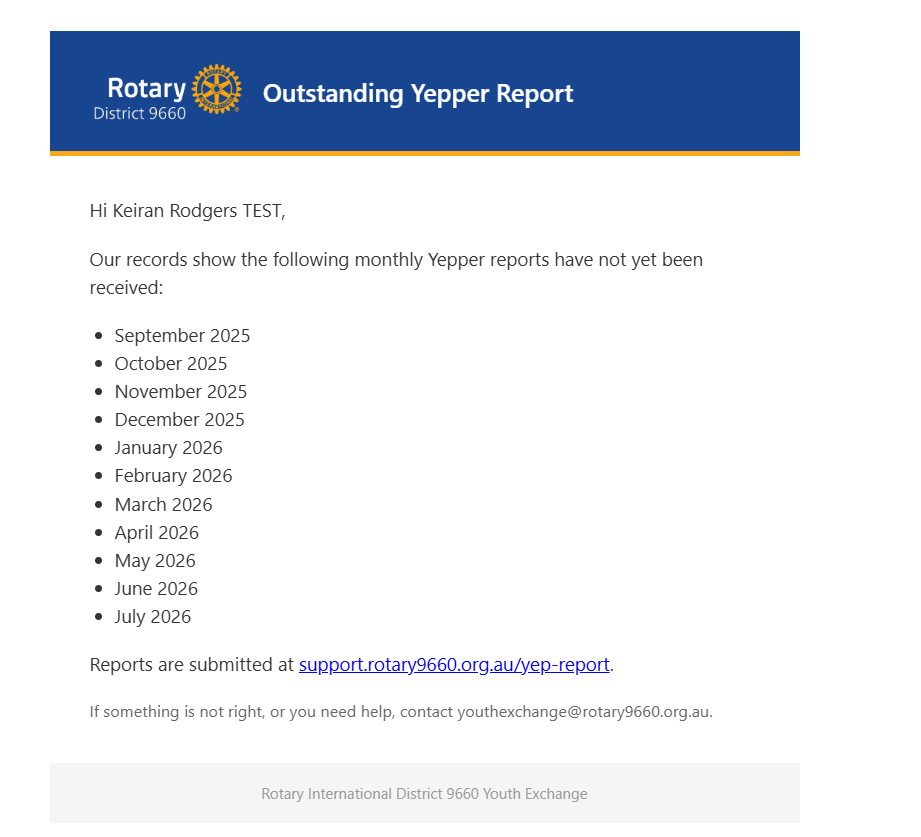
Getting this email is not a telling-off. Open the form, submit the months listed, and the reminders stop.
What this does not do
- It does not tell you how long your travel request will take to approve. Nobody can promise a timeframe, because it depends on real people checking their email.
- It does not check that your host parents' email address is correct. You type it in yourself, and it is your Club Counsellor who checks it when they approve.
- It does not replace talking to your host family, Club Counsellor or YEO in person. If something is wrong, tell them directly as well as using the form.
- It does not give you extra time on the monthly report deadline. There are no extensions.