


YEO to Student Wellbeing Report
A monthly check-in form completed by Youth Exchange Officers for each exchange student, submitted online and emailed as a branded PDF.
On this page
What is the wellbeing report?
The YEO to Student Wellbeing Report is a structured monthly check-in that Youth Exchange Officers complete for every exchange student in their care. It covers:
- Overall wellbeing scores (emotional, physical, school, social, host family, host club)
- Key areas: school and routine, host family placement, social and cultural adjustment, program compliance
- Student voice: what is going well, what is challenging
- Safeguarding and risk indicators
- Actions, follow-ups, and escalation
When submitted, the form generates a branded PDF with your signature and emails it directly to the Youth Exchange Chair and the Youth Exchange Coordinator.
flowchart TD
    A["Open the form - no sign-in needed"] --> B["Work through the 10 sections,
mirroring the paper form"]
    B --> C{"Concerns or safeguarding
indicators noted?"}
    C -- "Yes" --> D["Detail fields appear - record actions,
follow-ups and any escalation"]
    C -- "No" --> E["Record the next scheduled contact"]
    D --> E
    E --> F["Sign and submit - a branded PDF
is generated"]
    F --> G["PDF emailed to the Youth Exchange
Chair and Coordinator"]
Accessing the form
- Go to support.rotary9660.org.au/yeo-report.html
- The form loads immediately. No sign-in is needed.
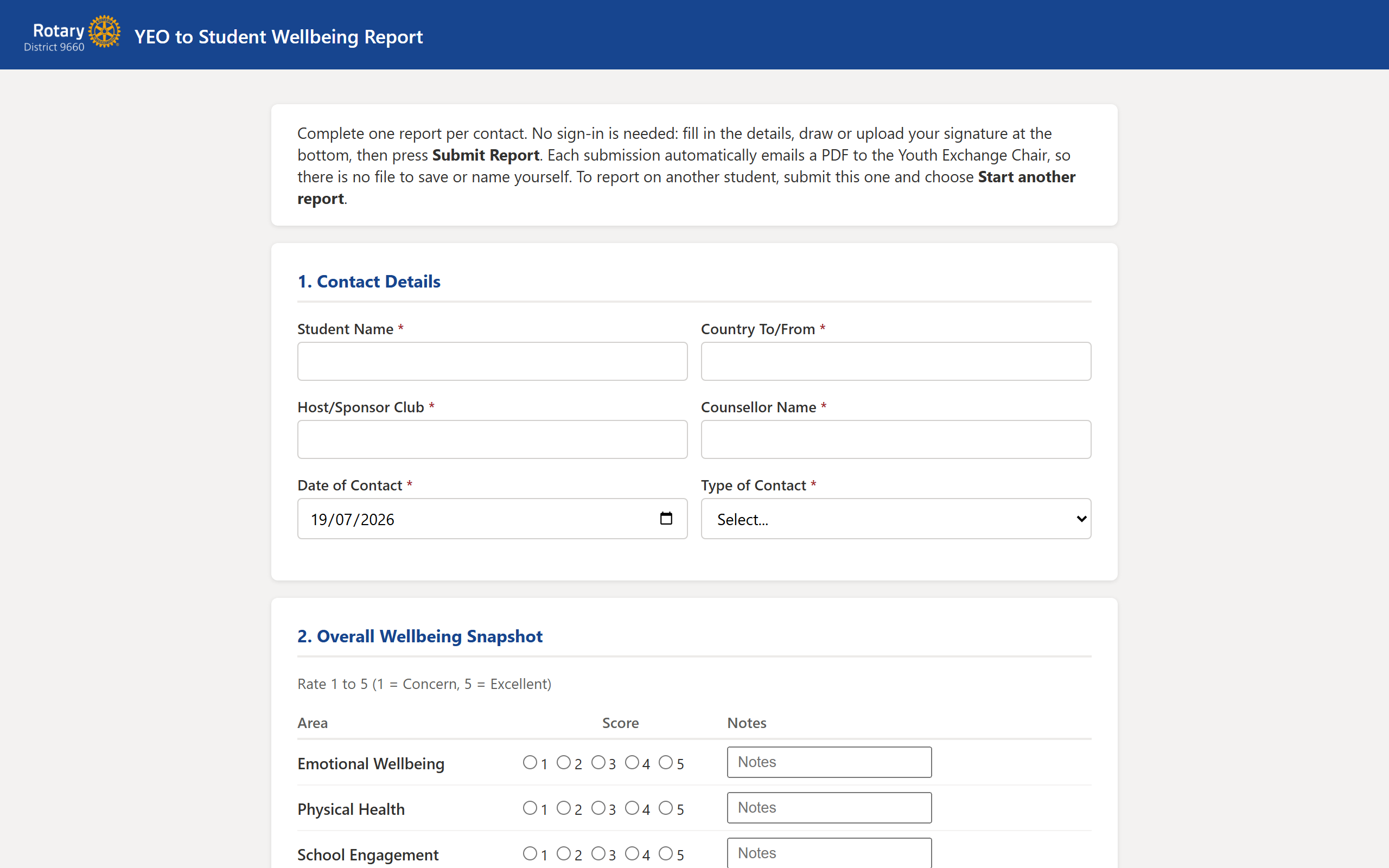
If you complete these reports regularly, bookmark the page or add it to your browser favourites for quick access.
Filling in the report
The form is split into 10 sections that mirror the official paper form:
- Contact Details - student name, country, host club, counsellor, date and type of contact.
- Overall Wellbeing Snapshot - rate each area from 1 (significant concern) to 5 (thriving). Add notes where relevant.
- Discussion Summary - free text summary of your conversation.
- Key Areas Check - yes/no questions across school, host family, social adjustment, and program compliance. Detail fields appear when you answer "Yes" to a concern.
- Student Voice - what the student says is going well, what is challenging, and any requests or concerns.
- Safeguarding and Risk Check - tick any indicators observed. Detail fields appear if you tick anything.
- Actions and Follow-Up - what needs to happen, who is responsible, and by when.
- Escalation - whether district-level escalation is required, and who has been notified.
- Next Contact - scheduled date and method for the next check-in.
- Report Completed By - your name (auto-filled), role, and date.
Adding your signature
At the bottom of the form you will see a signature area. You have two options:
- Draw your signature directly on the canvas using your mouse, trackpad, or finger on a touch screen.
- Upload signature to load an image file (PNG, JPG) of your signature from your computer.
Use the Clear button to start over if needed. Your signature is required before the form can be submitted.
Submitting the report
Once all required fields are filled and your signature is in place:
- Click Submit Report.
- The form generates a branded PDF in the background.
- The PDF is emailed as an attachment to the Youth Exchange Chair and the Youth Exchange Coordinator.
- A confirmation message appears on screen when the email has been sent.
Submit a separate report for each exchange student. If you need to re-submit a corrected report, simply fill in the form again. Both versions are kept in the audit trail.
Escalation and safeguarding flags
If you tick any safeguarding indicators in Section 6 or mark escalation as required in Section 8:
- The email subject line is prefixed with [ACTION REQUIRED].
- The email is marked as high importance.
- A red warning banner appears at the top of the email body listing the specific flags.
This ensures the Youth Exchange Chair and Coordinator see urgent reports immediately.
If a student is in immediate danger, contact the relevant authorities first, then complete this report as a record.
Audit trail
Every submission is automatically logged to a SharePoint list on the Youth Exchange site. This provides a searchable record of:
- Student name, country, and host club
- Contact date and type
- Wellbeing scores
- Who completed the report and when
- Whether escalation or safeguarding flags were raised
The list is at Youth Exchange SharePoint site > YEO Wellbeing Reports. Only users with access to the Youth Exchange site can view it.
Troubleshooting
The form does not load after signing in
Try a different browser or clear your cache. The form requires JavaScript to be enabled. If you are using a private/incognito window, cookies may be blocked.
The signature canvas is blank or tiny
Resize your browser window slightly. The canvas adjusts to the available space. If you are on a very narrow screen, try landscape orientation on a tablet or use a desktop browser.
I get an error when submitting
Check that all required fields are filled in (student name, contact date, wellbeing scores, and signature). If the error persists, take a screenshot and email support@rotary9660.org.au.
The recipients did not receive the email
Ask them to check Junk or Spam. The email is sent from support@rotary9660.org.au. If they still do not see it, email IT support with the student name and submission time.
Still stuck? Email support@rotary9660.org.au with a screenshot.